Know what’s on the shelf, at every location.
Each stock-tracked sale, delivery, transfer and count is recorded as a movement, so what’s on hand is always worked out the same way. Sizes and colours each have their own stock, barcode and reorder point.
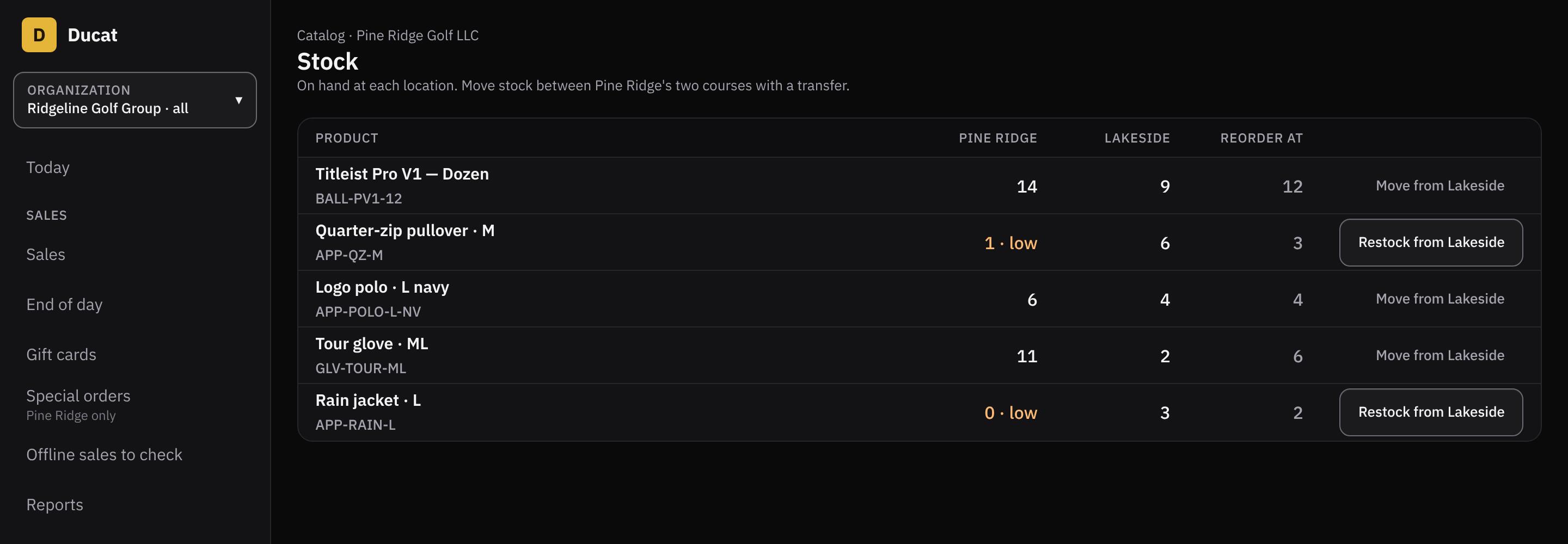
What it does today
6 shipped-
Stock recorded as movements
On hand is always worked out from the record.
-
Purchase orders and receiving
Order from a vendor by hand or from what’s low, then receive each delivery against what’s still due, in the back office. For products with Track stock on. The back office is open to clubs Ducat has set up: Ducat gives each login its access, and owners and managers save changes there.
-
Transfers between locations
On Stock and transfers in the back office: the stock leaves one location and arrives at the other in one step. For products with Track stock on. The back office is open to clubs Ducat has set up: Ducat gives each login its access, and owners and managers save changes there.
-
Counts
Count a shelf in the back office, then post the differences as adjustments. For products with Track stock on. The back office is open to clubs Ducat has set up: Ducat gives each login its access, and owners and managers save changes there.
-
Serial numbers
Added by location in the back office, in stock or sold; adding them doesn’t change stock. For products with Track stock on. The back office is open to clubs Ducat has set up: Ducat gives each login its access, and owners and managers save changes there.
-
Reorder points
Set for each location on Stock and transfers; items at or below theirs show as low. For products with Track stock on. The back office is open to clubs Ducat has set up: Ducat gives each login its access, and owners and managers save changes there.
How it works
-
1
Set up products
One product with a grid of sizes and colours, brands and barcodes. Send us your product list in a spreadsheet and we’ll bring it in. Importing it yourself in the back office, checking every row first, is built and opens once file storage and a worker are set up.
-
2
Order and receive
Raise a purchase order with a vendor, then receive against it.
-
3
Move and count
Transfer stock between locations; count it and see the difference.
-
4
Know what it’s worth
Stock is valued first-in-first-out or by weighted average, and items below their reorder point show as low.
Works with
Questions we hear
Can I bring my products?
Yes. Send us a spreadsheet of products with their SKU, name, cost, brand and categories, and we’ll bring them in. Importing it yourself in the back office, checking every row first, is built and opens once file storage and a worker are set up.
Do you track serial numbers?
Yes, for the items that need them.
Do I have to count everything?
No. Receiving and sales keep stock right; counts are there when you want one.
10 more items are being built or planned. The roadmap shows which. See the roadmap
See it with your own prices
We’ll email you when Ducat opens to new businesses.